Hello and happy Friday! Here’s a question worth sitting with: Does Google actually crawl your most important pages? Or is it spending all its time on filter URL combinations that nobody ever searches for, while your money pages wait in the queue?
This week, Barb Senkala, our Senior SEO Strategist here at Boulder SEO Marketing with over two decades of hands-on SEO experience, breaks down what Google’s December 2024 faceted navigation update actually means for your site, why most sites won’t benefit from it without doing the technical groundwork first, and what you need to do to make sure your highest-value pages get the crawl attention they deserve.
Watch the full video above to learn more.
What Is Faceted Navigation, Really?
Faceted navigation is your website’s filtering system. Shop by color. Filter by size. Sort by price. Every time a visitor clicks one of those filters, a new URL is often generated. So instead of a single product category page, you end up with hundreds or even thousands of URL combinations that show essentially the same content with minor variations.
Think about a mid-sized outdoor gear retailer. They might have a single hiking boots category page. But add filters for color, size, gender, brand, and price range, and suddenly that one page generates tens of thousands of URL combinations. Most of those URLs serve content that is nearly identical to the base page. Googlebot has no way to know that up front, so it crawls a large chunk of them to figure out whether they’re worth indexing.
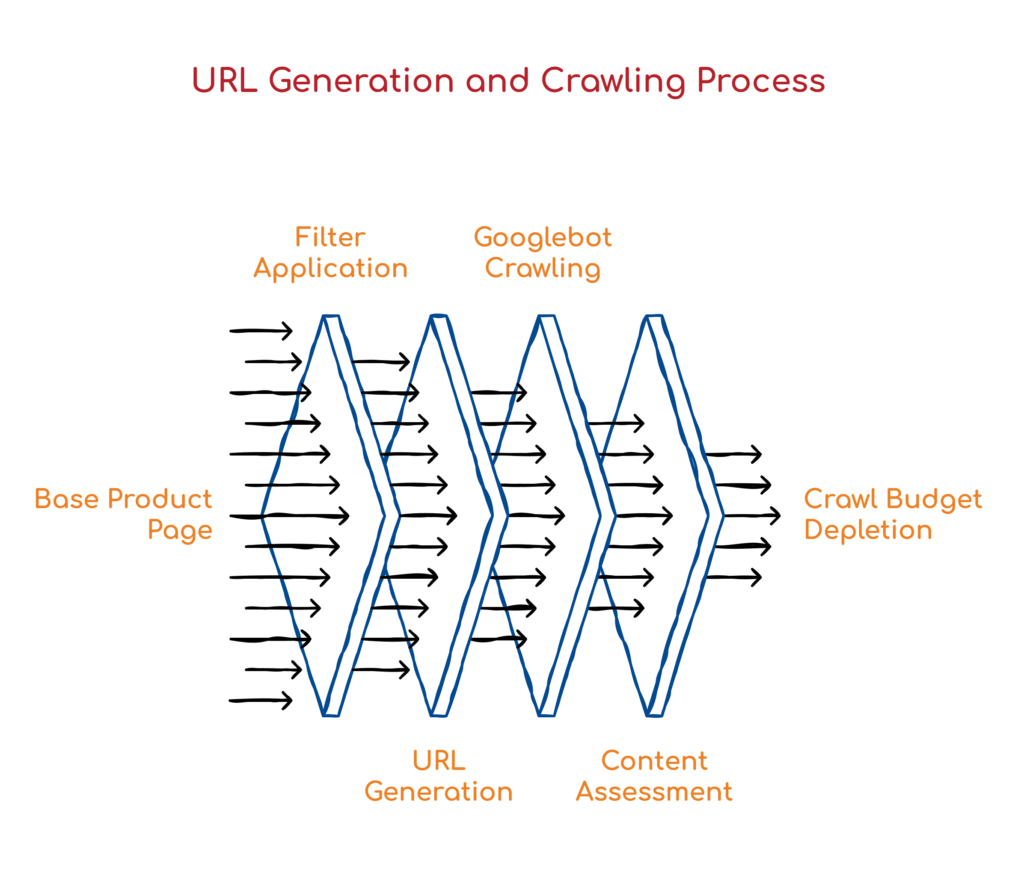
For large e-commerce sites or content platforms with filtering, this is a significant issue for crawl budget. Googlebot has limited time and resources allocated to your site. If it’s burning through those resources on filter combinations that serve near-identical content, your actual money pages, the ones tied to real search intent and real revenue, might not be getting crawled regularly at all. That means slower indexing of new content, delayed ranking for updated pages, and a general loss of search visibility that’s hard to trace back to the root cause.
What Google Actually Changed in December 2024
In December 2024, Google published a detailed blog post on faceted navigation and crawling. The core message confirmed what technical SEOs have known for years: faceted navigation is one of the biggest challenges for crawl efficiency on the web. But the update introduced something genuinely new.
Google’s crawlers are now smarter at automatically identifying facet-generated URL patterns. They’re getting better at recognizing when URLs are filter variations and adjusting crawl priority accordingly. That means Google is becoming more selective, learning to deprioritize faceted URLs that don’t add unique value, and directing more crawl budget toward your canonical, high-value pages instead.
Sounds like Google is doing the heavy lifting for you, right? In theory, it’s a step in the right direction. But here’s the nuance that matters: Google’s ability to do this accurately depends entirely on how well your technical setup is already in place. Your canonical signals, your robots.txt configuration, and your overall site architecture. If your faceted URLs don’t have clear canonicalization pointing back to the base category page, if your robots.txt isn’t guiding crawlers properly, if your site structure is a mess, Google may still waste significant crawl budget on those low-value pages regardless of the update. The update rewards sites that did the technical work. Everyone else is still leaving crawl budget on the table.
The Canonical Tag Mistake That Costs You the Most
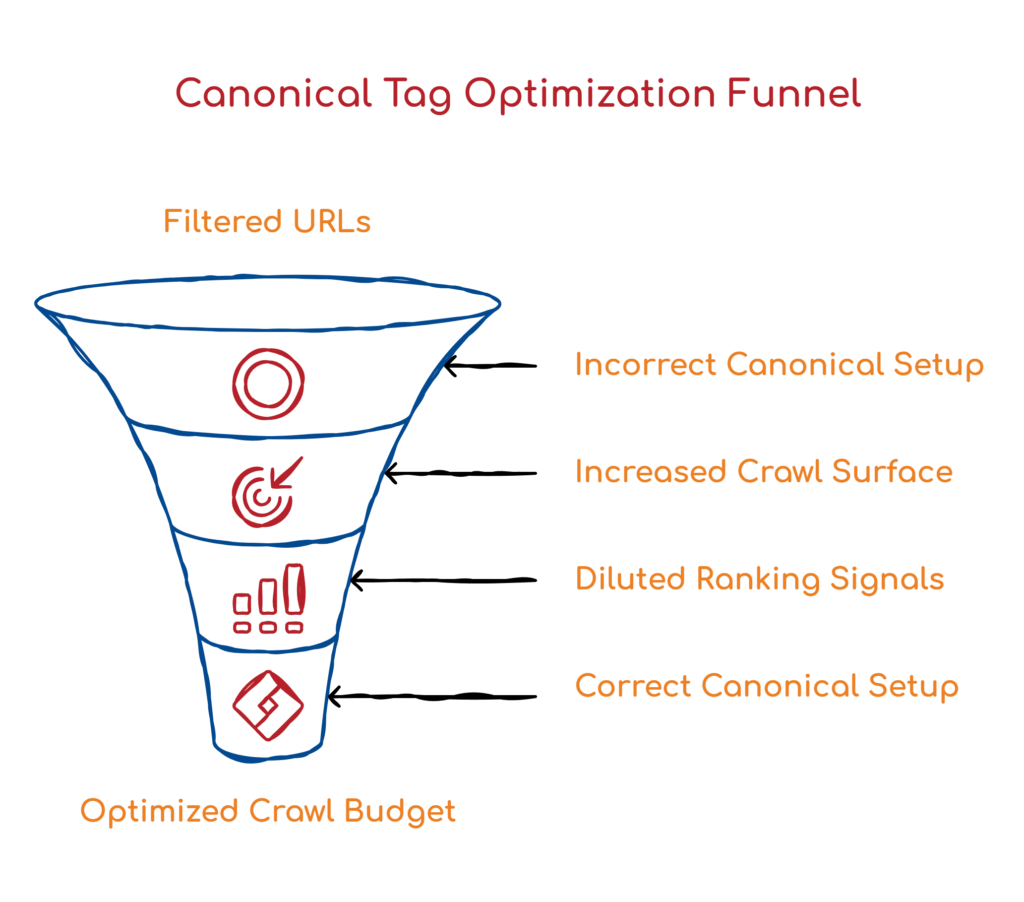
Of everything we see during site audits, this is the one that consistently surprises people. Canonical tags on filtered URLs are being set up incorrectly, which means site owners are unknowingly telling Google that every single filter combination on their site is unique, important, and worth crawling in full.
Here’s how it happens. When a filter URL is generated, say your hiking boots page filtered for red color, that URL gets its own canonical tag. If that canonical points back to itself rather than to the base, unfiltered category page, you’ve signaled to Google that the red-filtered version is an independent piece of content. Do that across hundreds of filter combinations, and you’ve essentially multiplied your crawl surface area by a factor of however many filter combinations your site generates.
The correct setup is straightforward. Every faceted URL should have its canonical pointing to the base category page, the one without any filter parameters. That single change tells Google clearly: all of these filtered versions are variations of one page. You want the main one indexed. This not only protects the crawl budget but also consolidates ranking signals back to the canonical version, rather than spreading them across hundreds of filter URLs that will never rank on their own.
How to Diagnose Whether This Is Actually Hurting You
Here’s the diagnostic process we use at BSM. Start by crawling your site with Screaming Frog or SiteBulb. Look at the total number of URLs being discovered compared to what you’d expect based on your actual content. If you’re seeing exponentially more URLs than content pages, faceted navigation is almost certainly the culprit.
Next, open Google Search Console, then navigate to Settings> Crawl Stats. Look at how many pages Google is crawling per day and how much time it’s spending on your site. If you have a 500-page site but Google is crawling 10,000 URLs daily, something is seriously off. Cross-reference that data with the Index Coverage report to see whether the right pages are actually getting indexed.
Then audit your canonical tags on filtered URLs. Every faceted URL should either be blocked from crawling or carry a canonical pointing back to the base category page. Check whether your filtered URLs have self-referencing canonicals. This is the most common error we find, and it’s also one of the fastest things to fix once it’s identified.
Finally, review your robots.txt file. You can disallow crawling of faceted URL patterns by blocking the specific query parameters that generate filter variations. Color, size, sort, brand, price range. These are the common ones. One important distinction to keep in mind: robots.txt controls crawl access, not indexing. The two mechanisms are separate and work differently. Blocking crawling through robots.txt does not automatically remove a page from the index. Confuse them and you can create a situation where pages are blocked from crawling but still appear in search results, or worse, accidentally block pages you actually need indexed.
robots.txt: The Right Tool, Used the Right Way
Let’s spend a moment specifically on robots.txt, because this is where much of the confusion lies. You can absolutely use robots.txt to prevent Googlebot from crawling faceted URL patterns entirely. The classic approach is to disallow the specific query parameters that generate your filters.
Gary Illyes from Google’s Search Relations team has pointed out that google.com/robots.txt itself contains examples of how to handle filter and search parameters, which is a useful reference if you’re not sure how to structure your rules. The important thing to understand is that robots.txt and noindex are not the same instruction and should not be treated as interchangeable. Robots.txt says: don’t crawl this. It does not say “remove this from the index.” If a page is already indexed and you add a robots.txt disallow rule for it, Google will stop crawling it, but won’t necessarily deindex it. For pages you want completely excluded from search, you need to combine both: noindex for indexing, and robots.txt or canonicalization for crawling.
One of the things that genuinely changes the pace of this work is the AI-assisted audit workflow we’ve built here at BSM. When we audit a client’s site for crawl issues, we run the crawl data through BSM Copilot, our proprietary AI research tool, to rapidly surface patterns that would otherwise take hours to identify manually. Faceted navigation analysis is a perfect use case for this.
Instead of combing through URLs one by one, we can quickly identify which facet combinations are generating the most crawl waste, what canonical patterns exist across the site, where robots.txt gaps are, and where the technical signals are broken or missing. The AI accelerates the discovery phase and helps our team reach key insights faster. But 20-plus years of hands-on SEO experience is still what determines which of those insights actually matter, which ones to prioritize, and what the right fix looks like for a specific site and business. AI doesn’t replace that judgment. It just means we spend more time on strategy and less time on data processing, which is exactly how it should work.
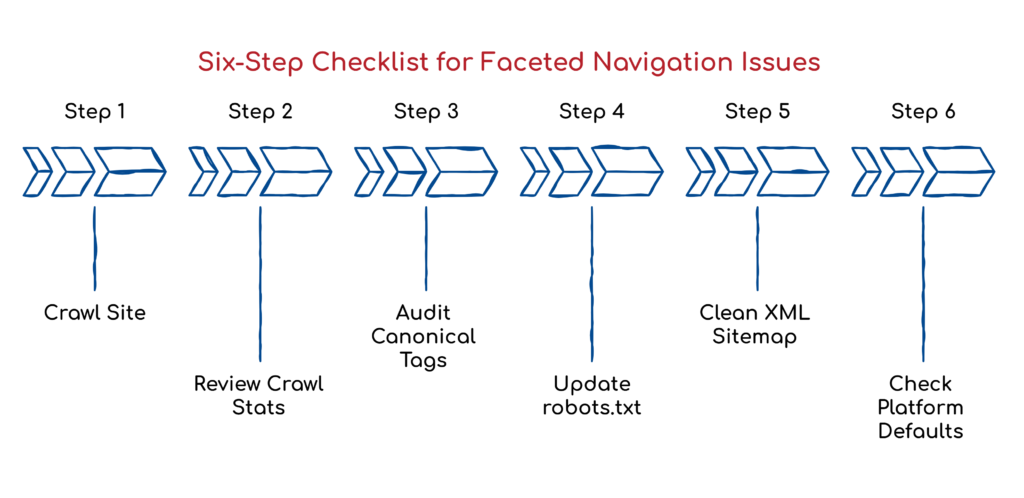
Your Six-Step Quick Win Checklist
If you’re dealing with faceted navigation issues right now, here’s where to start.
First, crawl your site and compare the total discovered URLs against your expected content page count. A large gap is your first signal.
Second, pull crawl stats from Google Search Console and look for anomalies in pages crawled per day relative to your actual site size.
Third, audit canonical tags on all filtered URLs and confirm they point to the base category page, not themselves.
Fourth, review your robots.txt and add disallow rules for the query parameters to generate your filter combinations.
Fifth, check your XML sitemap and remove any faceted URLs that have crept in there.
Sixth, if you’re on a platform like Shopify or Magento, check your default platform behavior.
Many of these platforms generate faceted URLs automatically, without built-in controls, and you may need a developer or a plugin to manage them properly.
What to Do Next
Faceted navigation has been a crawl budget headache for years. Google’s December 2024 update is a real step in the right direction, but it only benefits sites with a solid technical foundation. The technical work has to come first. Canonical tags, robots.txt configuration, and clean site architecture provide Google with the signals it needs to make smart crawl decisions, whether or not there is an algorithmic update.
If you’re not sure where your site stands on any of this, now is a good time to dig in. A crawl audit doesn’t have to be a massive project. Often, the most impactful fixes are also the most straightforward ones.
If you’d like us to review your site’s crawl efficiency, reach out to Boulder SEO Marketing. We’re happy to dig into the technical side with you and show you exactly where the opportunities are.
Have an amazing Friday and a great weekend.
Stay safe and healthy,
Cheers,
The Boulder SEO Marketing Team