Hello and happy Friday! Have you ever wondered how a single video can put your business in front of people on YouTube, Google AI Overviews, LinkedIn, Bluesky, and email all at the same time?
That is the exact question this week’s Friday SEO Tip answers. The episode is presented by Jonn Patrick Chua, Marketing Manager at Boulder SEO Marketing, who walks through the 5-phase workflow we use to produce a Friday SEO Tip every single week. One recording. Seven published assets. All from a single piece of source material, all generated from a single workflow. Watch the full video above to learn more.
Here’s why this matters right now. AI Overviews are intercepting a meaningful chunk of organic search traffic. Getting cited in an AI Overview is no longer optional. It’s a new ranking signal, and the way you earn that citation is by producing thorough, well-structured, multi-format content that lives on YouTube, on your website, on LinkedIn, on Google Business Profile, and in email. One blog post on its own no longer cuts it.
We built our weekly workflow to do two things. First, get cited in AI Overviews. Second, get our content onto every platform our audience actually uses. Below is the full process, phase by phase, with the tools and screens we use each week.
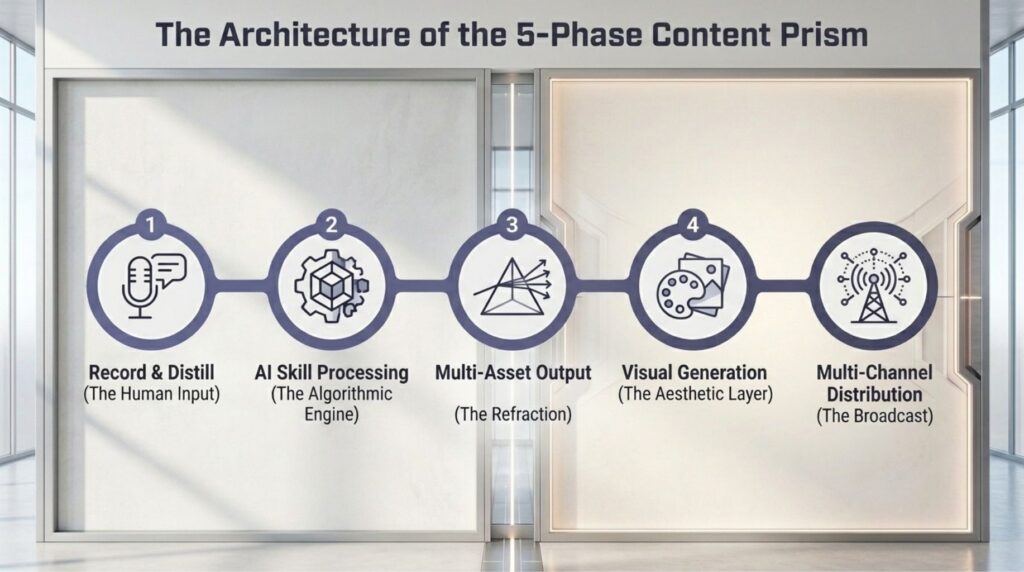
Phase 1: Recording in Riverside
Every Friday SEO Tip starts with a BSM subject matter expert in front of the camera. This week it’s Jonn. Next week it might be Chris, Daniel, Greg, or Barb. The presenter rotates. The format stays consistent.
We use Riverside because the audio and video quality is studio-grade, and the transcript is downloadable in seconds. Imagine how fast that is. Once the recording is finished, the file goes straight into the Riverside editor. Editing is where we apply layouts, remove filler words and unnecessary pauses, and enhance the audio so that both the video and the voice sound clean and professional.
Riverside has a Magic Audio feature that does the heavy lifting on audio enhancement. One click and the difference is noticeable immediately. The cleanup pass on filler words happens right next to it in the same interface, and the editor lets us trim, splice, and rearrange any segments that need to flow better. Once the video and audio are clean, the transcript download is a three-dot click away.
That transcript becomes the input for everything that follows. It is the single source of truth for the entire content package. Every downstream output is generated from this one file, which means consistency across platforms is built in from the start. If the transcript is clean, every output is clean. If the transcript is sloppy, every output inherits that. So the time we spend in this phase pays off across all other phases.
Phase 2: Triggering the Claude Skill
This is where the workflow gets interesting. We built a custom Claude skill specifically for Friday SEO Tip production. The transcript downloaded from Riverside is uploaded to Claude. The skill is triggered by a single command (e.g., “let’s create a Friday SEO Tip”), and we paste the anchor links we want included in the newsletters.
For those who haven’t worked with Claude skills before, a skill is a reusable set of instructions. It tells Claude exactly how to process the transcript, which voice to use, which brand rules to follow, and which deliverables to produce. Our skill knows the BSM brand voice. It knows which keywords we want anchored to which internal pages. It knows the URLs we link to. It knows the character ranges for meta titles and descriptions. It knows the format every output needs to follow.
The skill takes a few minutes to run. We usually queue it up and use the wait to start prepping the visual assets in the next phase. When it finishes, the output is a single, cleanly packaged content batch, ready for review. Nothing is on autopilot. Everything still goes through human review, but the lift on first-draft production drops dramatically. What used to be a full day of writing and formatting now compresses into a focused review pass.
Phase 3: The 12 Deliverables in a Single Pass
This is where the time savings really show up. The skill generates 12 deliverables in a single pass.
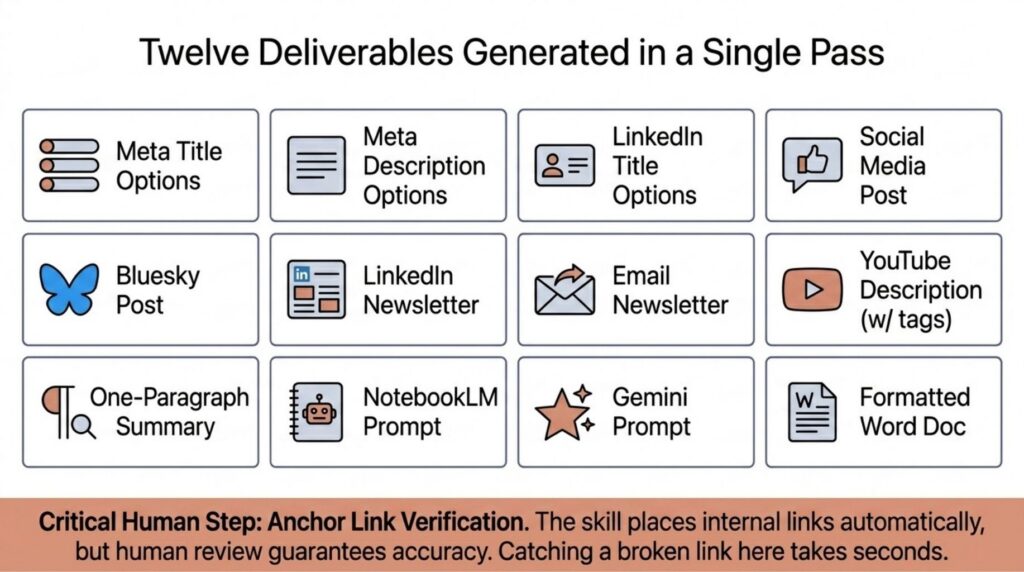
Meta title options. Meta description options. LinkedIn newsletter title options. The reason we generate options rather than a single locked version is to pick the strongest one without rerunning Claude from a different angle. The skill also produces a social media post, a Bluesky post, the full LinkedIn newsletter, an email newsletter, a YouTube description with timestamps and tags, a one-paragraph summary for email blasts, a NotebookLM visual prompt, and a Gemini image prompt for the cover image.
For an editable, copy-paste-friendly version of everything, we ask Claude to create a downloadable Word document. The skill outputs the same content in a formatted .docx file with the anchor links already in place, ready for handoff to whoever is publishing. From there, the content is ready to move into the visual phase.
One thing we verify at this stage is that every anchor link is in the right place. Finding the right local keywords anchor. Internal links back to BSM service pages. The skill handles the anchoring automatically based on the URLs we paste in at the start, but we still review every link before moving on. The cost of catching a broken or misplaced link at this stage is a few seconds. The cost of catching it after publication is a republish across every platform.
Here is another upside that may not be obvious. Because the skill outputs structured options at every stage, the team running this workflow does not have to be the same person every week. The presenter can rotate. The reviewer can rotate. The publisher can rotate. The skill is the constant. That makes the workflow durable. If someone is out sick or on vacation, the workflow still ships because the institutional knowledge lives in the skill, not in any single team member’s head.
Phase 4: The Visual Layer
Two visual assets are generated for every Friday SEO Tip. The LinkedIn newsletter cover image and the inline images used throughout the newsletter.
For the cover image, we use the Gemini prompt the skill produced. We copy the prompt, paste it into Gemini, and run a few variations. Gemini takes a few minutes per generation, so we usually run three or four at the same time and pick the strongest one when they all finish. The skill is designed to rotate visual concepts across episodes so the cover images don’t all look the same week after week. That variation matters for LinkedIn engagement. A scrolling feed punishes visual sameness, and rotating concept families fixes that.
For the inline images, we use NotebookLM. NotebookLM needs a resource to read from before it can generate visuals, so we copy the full LinkedIn newsletter content and paste it in as a copied-text source. NotebookLM also accepts file uploads, URLs, and Google Drive files, but copied text is the fastest path for our workflow. Once the source is uploaded, we open the slide deck feature, paste the NotebookLM visual prompt the skill produced, and hit generate.
The slide deck output provides visual options in various styles. We select 3 or 4 of the strongest and drop them inline into the newsletter content. The goal here is variety. A newsletter that’s all text gets skimmed. A newsletter with the right inline visuals at the right moments gets read. This is also where we conduct a final review of every output for anchoring, brand-term accuracy, and any spots where the content could be strengthened with an internal link back to BSM.
Phase 5: Final Review and Multi-Platform Publishing
The last phase is a final read-through of the full content package before anything goes live. This is where we catch anything that slipped through, verify every anchor link one more time, and make sure every output is consistent with the others. The final reviewer is usually someone who didn’t originally draft the content, which gives us a fresh set of eyes on every piece of output.
Then the content gets pushed across every distribution channel that matters. YouTube for the video. GoHighLevel for the Google Business Profile post and the email campaign. LinkedIn for the newsletter article and the social post. Bluesky for the short-form post. The LinkedIn company page and personal feeds for the social distribution.
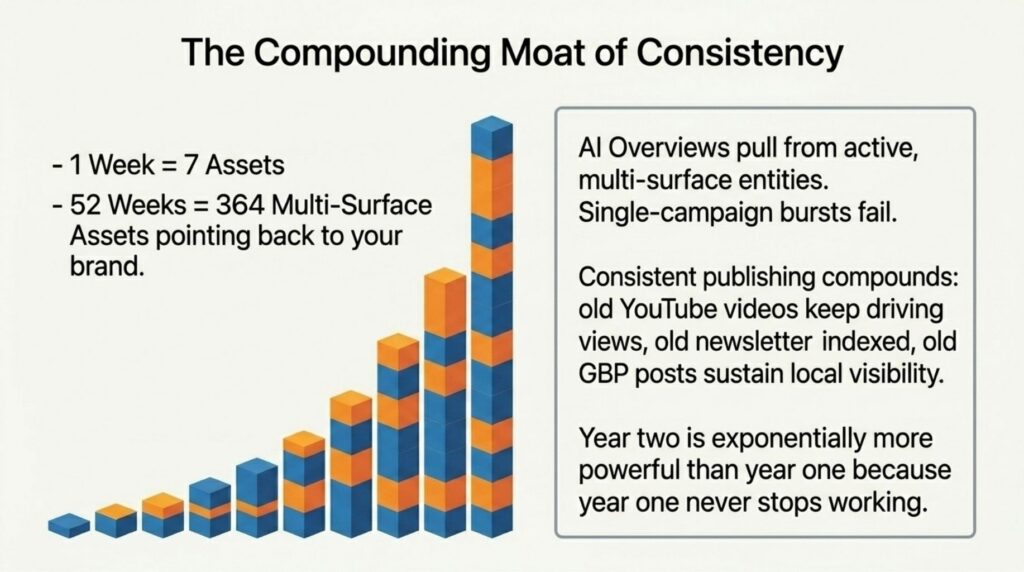
That’s seven published assets from one recording. Every single week. No batching. No skipping weeks. The consistency itself is the moat. Most agencies and most subject matter experts publish in bursts. We publish on a schedule, and the schedule is what makes the workflow compound.
Why This Workflow Actually Compounds
The strategic reasoning behind the workflow comes back to where search is going. AI Overviews are now intercepting a meaningful percentage of organic clicks. The way you stay visible in an AI Overview is by producing thorough, well-structured, multi-format content that spans YouTube, your website, LinkedIn, Google Business Profile, and email. A blog post alone is not enough anymore. AI Overviews pull from multiple surfaces, and the surfaces they pull from most are the ones where your brand already has consistent, ongoing content. Single-channel publishing leaves too much surface area uncovered.
Producing weekly content this way also compounds in a way that one-off campaigns never do. Every Friday SEO Tip adds another YouTube video, another newsletter, another LinkedIn post, another Bluesky post, another Google Business Profile entry. Over a year, that’s 50-plus weeks of multi-platform content all pointing back to the same brand and the same expertise. The compounding effect is what makes it work. Year two of this workflow is exponentially more powerful than year one because everything published in year one is still working for you. Old YouTube videos keep getting watched. Old newsletters keep being indexed. Old GBP posts continue to contribute to local visibility.
What to Do Next
If you run a marketing team or are a subject matter expert who wants to start producing weekly content that actually compounds, this is the workflow you can save and replicate. The tools are accessible. The skill structure is repeatable. The phases are sequential and easy to hand off across a team as it grows. Start with one recording, build out the skill on your end, and let the workflow do the rest. This is also a workflow we run for our own clients in different shapes. A subject matter expert at a client business can record once a week and end up with a multi-channel content program that compounds the same way ours does. The format scales down for solo operators and scales up for full marketing teams.
If you want to see the workflow in action every Friday, you can subscribe to our Friday SEO Tip newsletter. New tip every week, direct to your inbox, packaged using the exact process we just walked through.
Have an amazing Friday and a great weekend.
Stay safe and healthy,
Cheers,
The Boulder SEO Marketing Team